
JVC Smart Music Control3.301.656 - Google Play
You'll be able to see results in few seconds.
Publisher Description
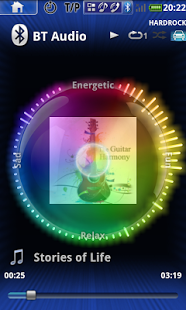
JVC Smart Music Control(JSMC) is a free standalone music player application that can automatically create a music playlist in a unique way – such as by the “mood” that you are now in. And you can perform operations by either simple gesture control or by voice command.
JSMC is also an application that connects and controls compatible JVC car audio receivers via Bluetooth® like a wireless remote control. This application can display a JVC car audio receiver’s source information on the smartphone’s screen, and enables the user to perform operations on the JVC car audio receiver as well.
And more, JSMC have HOME Launcher to launch the navigation app, to call from the contact list, or to launch the app that you registered.
INNOVATIVE GESTURE AND VOICE CONTROL
You can command basic controls such as pause, skip or repeat simply by finger gesture operations on the screen of the smartphone. Also, you can make a search for a specific song, album or an artist from your playlist by voice with the built-in voice recognition function. You can use gesture and voice control in both modes: standalone music player and remote control application.
*Voice command : English/Spanish/German/French Only, Voice music search : Select language from your smartphone
ADVANCED MUSIC PLAYER
JSMC analyzes all of your songs that are in your Android™ smartphone, and creates a playlist according to your mood. Once the application has completed the analysis of the songs, simply move the “mood ball” to your current mood, and this application will generate a list of songs that most fits your mood.
You can also make sound adjustments with the built-in 5 preset equalizer. You can also create and save 3 of your own EQ settings.
EXPAND THE JVC CAR RECEIVER EXPERIENCE USING WIRELESS COMMUNICATION
JSMC can display a JVC car audio receiver’s source information on the smartphone screen, and control the receiver by simple gesture controls or by voice command. This application uses Bluetooth® to communicate with the JVC car audio receiver.
And more, JSMC can interrupt the music while voice guidance of smartphone navigation app.
KEY FEATURES
★Control by Gesture, Voice and Proximity sensor
★Browse and play music by songs, albums, artists, playlists, mood.
★Mood Blender generates playlist based on your selected mood.
★Customizable Equalizer with 5 presets and 3 user memories.
★Bluetooth Remote Control and Information Viewer of JVC car receiver
★SMS Reader
★Post to Twitter and Facebook
★Both Portrait mode and Landscape mode is available.
★Customize the Background
★Both Portrait mode and Landscape mode is available.
★Customize the Background
★HOME Launcher (Navi Shortcut, Phone Caller Applet, App Launcher)
★Navigation Voice Guidance Interruption
★Floating HOME button
About User Guide and trouble shooting
http://www.jvc.net/car/app/jsmc/index.html
-Note
This application does not guarantee full compatibility with all devices, even if system requirements are met.
System requirements: Android™ 2.3 and above and Bluetooth® Serial Port Profile are required.
Gapless Playback: Android™ 4.1 and above
Compatible JVC car audio receiver models:
Via Bluetooth
KD-AR855BT/AR959BS/DB95BT
KD-R85xBT/R95xBT/SR80BT
KD-X310BT/X31MBS
KW-R910BT
Via Bluetooth (without receiver setting function)
KD-R84xBT/A845BT/R74xBT,
KD-X250BT,
Via Bluetooth (without volume control and receiver setting function)
KD-R73xBT/A735BT/HDR71BT/AHD75BT/SD80BT/R60(*1)/A65(*1)/R50(*1),
KD-R80BT/A95BT/R90BT,
KW-R800BT/R700BT/R600BT/HDR81BT/SD70BT/R900BT,
KD-X50BT/X80BT/X70BT
(*1) KS-BTA50 required.
Via USB
KD-AR555/AR755/AR855BT/AR959BS/DB65/DB95BT
KD-R45x/R55x/R65x/R75x/R85xBT/R95xBT/SR40/SR60/SR80BT
KD-X110/X115/X210/X215/X310BT/X31MBS
KW-R510/R710/R910BT
KD-R84xBT/A845BT/R74xBT/R64x/A645/R54x/HDR52/AHD57/R44x
KD-X250BT/X200/X150/X100
About JVC Smart Music Control
The company that develops JVC Smart Music Control is JVCKENWOOD Corporation. The latest version released by its developer is 3.301.656.
To install JVC Smart Music Control on your Android device, just click the green Continue To App button above to start the installation process. The app is listed on our website since 2015-02-03 and was downloaded 0 times. We have already checked if the download link is safe, however for your own protection we recommend that you scan the downloaded app with your antivirus. Your antivirus may detect the JVC Smart Music Control as malware as malware if the download link to com.jk.openlink is broken.
How to install JVC Smart Music Control on your Android device:
- Click on the Continue To App button on our website. This will redirect you to Google Play.
- Once the JVC Smart Music Control is shown in the Google Play listing of your Android device, you can start its download and installation. Tap on the Install button located below the search bar and to the right of the app icon.
- A pop-up window with the permissions required by JVC Smart Music Control will be shown. Click on Accept to continue the process.
- JVC Smart Music Control will be downloaded onto your device, displaying a progress. Once the download completes, the installation will start and you'll get a notification after the installation is finished.
Program Details
System requirements
Download information
Pricing
Version History
version 3.301.656
posted on 2015-02-03
Version 3.301 Rev 656,Customize the color setting of receiver (for 2015 receivers),Customize the HPF/LPF setting of receiver (for 2015 receivers),Improve stability
version 2.005.331
posted on 2013-03-06
Several fixes and updates
Disclaimer
Official Google Play Link
We do not host JVC Smart Music Control on our servers. We did not scan it for viruses, adware, spyware or other type of malware. This app is hosted by Google and passed their terms and conditions to be listed there. We recommend caution when installing it.
The Google Play link for JVC Smart Music Control is provided to you by apps112.com without any warranties, representations or guarantees of any kind, so access it at your own risk.
If you have questions regarding this particular app contact the publisher directly. For questions about the functionalities of apps112.com contact us.
